 Swiss travel eSIM provider
Using your eSIM
How do I start using my eSIM when I arrive?
Turn the eSIM on, select it for mobile data and turn on data roaming for it. It connects to a local network within a few minutes.
After landing, take a minute to switch your data over to the eSIM.
iPhone
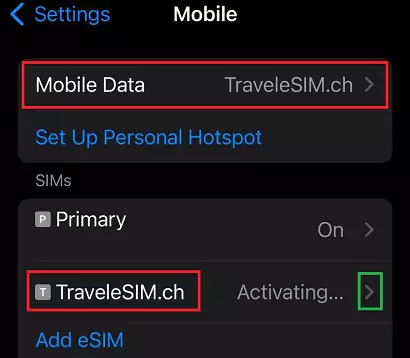
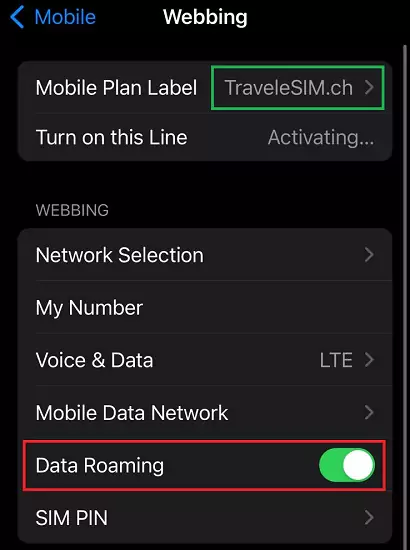
- Go to Settings > Mobile Data (or Cellular) and set Mobile Data to the TraveleSIM line. Tap the TraveleSIM line to open its settings.

- Make sure Turn On This Line is on and turn on Data Roaming.
Android
- Go to Settings > Connections > SIM manager (Samsung) or Network & internet > SIMs (Pixel).
- Turn the eSIM on and choose it for Mobile data.
- Turn on Roaming for the eSIM.
Avoid charges on your home line
Turn off data roaming on your home SIM so it does not use data abroad. You can keep it on for calls and SMS, which your home operator may charge for.
No connection after a few minutes? See My eSIM has no internet.
Last updated October 15, 2026
Still need help?
Send us a message with your order number and we will get back to you.